
Serving LLMs in Production with vLLM
Published on February 22, 2026
As someone building production-grade AI systems end-to-end, inference performance quickly becomes the main bottleneck when scaling LLM-based applications.
In real-world deployments, the challenge is not only accuracy, but also:
- Time To First Token (TTFT)
- Tokens Per Output Time (TPOT)
- Latency under concurrency
- GPU memory utilization
This is exactly where vLLM introduces two major contributions to LLM serving:
vLLM Contributions
1. PagedAttention
Traditional KV-cache implementations in transformer inference allocate memory contiguously for each sequence.
This leads to:
- GPU memory fragmentation
- Over-allocation of KV cache
- Inefficient batching when sequences have different lengths
vLLM introduces PagedAttention, inspired by virtual memory paging in operating systems.
Instead of storing KV tensors as contiguous blocks:
- KV cache is split into fixed-size memory pages
- Sequences dynamically map to these pages
- Memory becomes non-contiguous but logically consistent
This allows:
- efficient KV memory reuse
- reduced fragmentation
- higher batch sizes
- better GPU utilization
PagedAttention is the key enabler allowing vLLM to support large numbers of concurrent requests without exhausting GPU memory.
2. Dynamic Continuous Batching
Static batching (used in most inference stacks) waits for:
N requests before launching GPU inference
This introduces unnecessary latency for early requests.
vLLM implements continuous dynamic batching, meaning:
- incoming requests are inserted in the batch during generation
- new tokens from different sequences are processed together
- GPU compute is always saturated
This allows:
- lower TTFT
- improved throughput
- graceful degradation under load
- efficient multi-user serving
This is particularly critical for SaaS deployments such as:
- conversational agents
- RAG systems
- copilots
- internal CAF knowledge assistants
- AI-powered workflow automation tools
Running vLLM with Gemma-2-2B-IT
Below is the command I use to deploy vLLM locally on my RTX4090 (24GB VRAM) using Docker and expose an OpenAI-compatible API.
⚠️ Note on RTX4090 (SM_89) Compatibility
At the time of writing, the vllm:latest (version v0.16.0) Docker image may present CUDA compatibility issues when running on consumer GPUs such as the RTX4090 (SM_89). This is because the latest vLLM images are built against CUDA 13 toolchains that ship PTX (Parallel Thread Execution) compiled for SM_90 architectures, which may lead to runtime incompatibilities or degraded performance on Ada Lovelace GPUs like the RTX4090 or L4. That’s why version 0.11.0 is used:
docker run --gpus all -p 8000:8000 \
-e HUGGING_FACE_HUB_TOKEN=<your-huggingFace-token> \
vllm/vllm-openai:v0.11.0 \
--port "8000" \
--model "google/gemma-2-2b-it" \
--gpu-memory-utilization 0.9 \
--max-model-len 4096 \
--max-num-seqs 32
The server exposes the OpenAI-compatible endpoint at:
http://localhost:8000/v1/chat/completions
Benchmarking vLLM with Locust
To evaluate inference performance under load, we measure:
- TTFT — Time To First Token
- TPOT — Time Per Output Token
- Latency — total generation time
- ms/token — decode duration per token
The experiment is conducted as follows:
- total duration: 15 minutes
- warmup phase: 5 minutes
- metrics reset after warmup
- experiment 1: 1 user
- experiment 2: 32 concurrent users
Locust Configuration
from locust import HttpUser, task, between, events
from locust.stats import RequestStats
import time
import json
import gevent


@events.test_start.add_listener
def on_test_start(environment, **kwargs):

    def reset_after_warmup():
        warmup = 300
        print(f"Warmup phase started for {warmup}s...")
        gevent.sleep(warmup)

        print("Warmup finished — resetting stats now")
        environment.runner.stats.reset_all()
        environment.runner.exceptions.clear()

    gevent.spawn(reset_after_warmup)


class LLMUser(HttpUser):

    wait_time = between(0.5, 1)

    @task
    def chat_completion(self):

        payload = {
            "model": "google/gemma-2-2b-it",
            "messages": [
                {"role": "user", "content": "Explain RAG in 3 sentences"}
            ],
            "max_tokens": 200,
            "stream": True
        }

        start = time.time()
        first_token_time = None
        last_token_time = None
        token_count = 0

        with self.client.post(
            "/v1/chat/completions",
            json=payload,
            stream=True,
            catch_response=True
        ) as response:

            for chunk in response.iter_lines():

                if chunk:
                    now = time.time()

                    if first_token_time is None:
                        first_token_time = now

                    token_count += 1
                    last_token_time = now

            end = time.time()

            if first_token_time:

                ttft = first_token_time - start
                decode_time = last_token_time - first_token_time
                latency = end - start

                tpot = decode_time / (token_count - 1) if token_count > 1 else 0
                tok_per_sec = token_count / latency if latency > 0 else 0

                events.request.fire(
                    request_type="LLM",
                    name="TTFT",
                    response_time=ttft * 1000,
                    response_length=token_count
                )

                events.request.fire(
                    request_type="LLM",
                    name="TPOT",
                    response_time=tpot * 1000,
                    response_length=token_count
                )

                events.request.fire(
                    request_type="LLM",
                    name="Latency",
                    response_time=latency * 1000,
                    response_length=token_count
                )

                ms_per_token = 1000 / tok_per_sec if tok_per_sec > 0 else 0

                events.request.fire(
                    request_type="LLM",
                    name="ms_per_token",
                    response_time=ms_per_token,
                    response_length=token_count
                )

                response.success()
            else:
                response.failure("No tokens received")
Running the Evaluation
locust -f locustfile.py --host=http://localhost:8000
Run:
- first with 1 user
- then with 32 concurrent users to observe the impact of PagedAttention + Dynamic Batching on:
- TTFT stability
- throughput
- decode latency
- GPU saturation
This setup is particularly relevant when deploying production LLM services behind:
- RAG pipelines
- LangGraph orchestrators
- internal copilots
- AI workflow automation platforms
where concurrency — not single-query latency — becomes the dominant scaling constraint.
📈 Results
We evaluate the performance of vLLM serving the google/gemma-2-2b-it model using the previously described Locust setup.
Each experiment is run for:
- total duration: 10 minutes
- warmup phase: 5 minutes
- metrics collected after warmup only
Two serving conditions are tested:
- single-user load (1 concurrent request)
- multi-user load (32 concurrent requests)
Observed behavior under a single user:
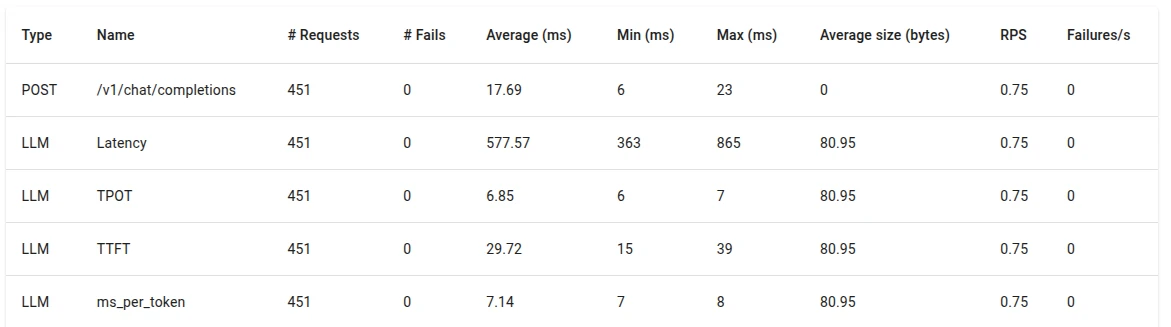
- low TTFT due to immediate batch scheduling (29.72 ms)
- stable TPOT across requests (6.85 ms)
- minimal variance in latency per token (7.14 ms)
- GPU utilization below saturation (~22 GB)
Under concurrent load (32 concurrent users), vLLM activates:
- PagedAttention KV memory virtualization
- dynamic continuous batching
Despite increased concurrency, we observe:
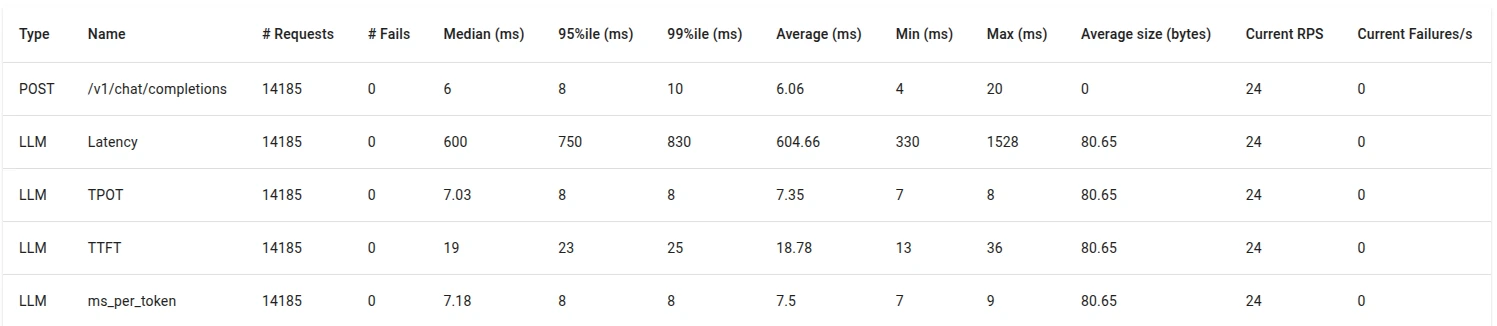
- stable TTFT (18.78 ms)
- stable TPOT (7.35 ms)
- stable latency per token (7.5 ms)
- improved throughput (tokens/sec)
- GPU utilization remaining stable (~22 GB)
PagedAttention prevents KV-cache fragmentation across sequences of varying lengths, while dynamic batching allows token generation across multiple requests to share compute kernels efficiently.